Try the Hitech Billsoft Software today and grow your business
Join Millions of Business Owners already saving time and
money with Hitech Billsoft.
Businesses create GST invoices daily, for requesting payments and as tax documents. It is a very important document used for GST reporting, Input Tax Credit reconciliation, e-invoice generation, e-way bill processing and transaction verification. Yet, businesses often miss important details, miss the required fields and hence face audit issues.
Even if you feel you have covered everything, even a small miss of details can cause big problems. Your buyer can miss the ITC. Most times, it is the smallest of details that can cause mismatch in reporting. So, it is advised that you cover all the mandatory fields as stated by Rule 46. This ensures your compliance is perfect and reduces the risk of audit issues.
All the particulars that should be present in the GST invoice are stated in the Rule 46 of the Central Goods and Services Tax Rules, 2017 It is important, that regardless of the format or design, businesses use the correct fields and information in their invoice. THe mandatory fields stated by the Rule 46 are for all types of businesses, whether you are a small business owner or a large enterprise.
Read this entire blog to gain deeper understanding of the fields which are mandatory for GST invoice.
Rule 46 of the CGST Rules prescribes the particulars to be included in a tax invoice issued under Section 31 of the CGST Act.
The rule applies subject to special invoice provisions under Rule 54 for specified industries and transaction types.
As per Rule 46, Businesses can use any layout, design and color of their choice and create their Invoice from any software or billing software. But, the invoice should contain all the stated fields under GST Invoice Rules.
The following table can be used as a quick GST invoice audit checklist.
| No. | Mandatory invoice field | When required | What the auditor should verify |
|---|---|---|---|
| 1 | Supplier's legal name | Every tax invoice | Name agrees with GST registration records |
| 2 | Supplier's address | Every tax invoice | Correct registered or declared business address is used |
| 3 | Supplier's GSTIN | Every tax invoice | GSTIN is active and belongs to the invoicing location |
| 4 | Invoice serial number | Every tax invoice | Consecutive, unique for the financial year and within 16 characters |
| 5 | Invoice date | Every tax invoice | Correct issue date and financial year |
| 6 | Recipient's name and address | Registered recipient; specified unregistered supplies | Details agree with customer records |
| 7 | Recipient's GSTIN or UIN | Where recipient is registered | GSTIN is valid, active and belongs to the customer |
| 8 | Delivery address | Where applicable | Actual delivery address is stated correctly |
| 9 | State name and state code | Where applicable | State agrees with GSTIN, place of supply and address |
| 10 | HSN or SAC code | As applicable | Correct code and required number of digits are used |
| 11 | Description of goods or services | Every invoice line | Description clearly identifies the supply |
| 12 | Quantity and UQC | For goods | Quantity and recognised unit code are entered |
| 13 | Total value of supply | Every tax invoice | Total value reconciles with line items |
| 14 | Taxable value | Every taxable supply | Discounts and abatements are adjusted correctly |
| 15 | GST rate | Every taxable line | Correct CGST, SGST, IGST, UTGST or cess rate is shown |
| 16 | Tax amount | Every taxable line or summary | Tax values agree with taxable value and applicable rate |
| 17 | Place of supply | Interstate supplies | State name and code are stated correctly |
| 18 | Reverse-charge indicator | Every tax invoice | Invoice clearly states whether reverse charge applies |
| 19 | Signature or digital signature | Subject to electronic-invoice exception | Signed by supplier or authorised representative where required |
| 20 | Signed QR code with embedded IRN | Invoice covered by e-invoicing | QR code received from the IRP is present and scannable |
| 21 | E-invoice exemption declaration | Covered-turnover taxpayer exempt from Rule 48(4) | Prescribed declaration appears on non-IRP invoice |
| 22 | Export or SEZ endorsement | Export or qualifying SEZ supply | Correct endorsement and destination details are included |
Not every row applies to every transaction. The auditor must determine which fields are mandatory based on the customer's registration status, supply type, turnover, place of supply and e-invoice applicability.
Every tax invoice should show the supplier's:
The GSTIN should belong to the registration from which the supply is being made.
A company with GST registrations in Delhi, Maharashtra and Karnataka should not use the Maharashtra GSTIN for a supply being invoiced from its Delhi registration.
Audit checks
Common failure: A business operates from multiple states but uses one GSTIN on all invoices.
Recommended fix: Configure each GST registration separately in the billing system and restrict users to the correct invoice series and GSTIN.
The GST invoice number must:
Businesses may maintain multiple series for different branches, locations or business units, provided each series is properly controlled.
Valid examples: INV-001, FY26/1001, DEL-INV-015, MUM/26/0025
Audit checks
The invoice should state the correct date of issue.
The date affects:
Audit checks
For taxpayers with AATO of ₹10 crore or more, eligible e-invoice documents are subject to the applicable 30-day IRP reporting restriction.
For a registered recipient, the tax invoice should contain:
The GSTIN entered on the invoice should belong to the entity purchasing the goods or services.
Audit checks
Unregistered recipients: Where the recipient is unregistered and the taxable supply is ₹50,000 or more, the invoice should generally include:
For a taxable supply below ₹50,000, these details should be included where the unregistered recipient requests them.
Goods are classified using HSN codes, while services are classified using SAC codes. The invoice should contain the correct classification and the required number of digits.
| Aggregate annual turnover in preceding year | Invoice requirement |
|---|---|
| Above ₹5 crore | Six-digit HSN/SAC for applicable supplies |
| Up to ₹5 crore | Four-digit HSN/SAC for B2B supplies |
| Up to ₹5 crore -- B2C | Four-digit reporting is generally optional unless otherwise required |
| Specified notified supplies | Eight-digit classification may be required |
Audit checks
Every invoice line should contain a clear description of the supply.
Descriptions such as “item,” “service,” “goods” or “charges” may not provide enough information for customers, auditors or tax teams to understand the transaction.
| Weak description | Better description |
|---|---|
| Product | Stainless steel water bottle, 1 litre |
| Service | Website maintenance service for June 2026 |
| Charges | Freight charges for Invoice INV-250 |
| Material | Cotton fabric, 80 GSM |
| Consulting | GST return reconciliation consulting service |
The description should agree with the HSN or SAC classification.
For goods, the invoice should contain:
Examples include: NOS, KGS, LTR, MTR, PCS, BOX, SET.
The applicable code should agree with the unit maintained in the product master and with the e-invoice or GSTR reporting requirement.
Audit checks
The invoice should display the total value of goods or services supplied.
The auditor should reconcile:
Gross line value − line-level discounts = taxable value + GST + cess + other charges − invoice-level discount, where correctly applied = invoice total
The final invoice total should agree with the accounting entry and customer balance.
Taxable value is the value on which GST is calculated after considering applicable discounts or abatements.
The invoice should clearly distinguish:
Audit checks
The invoice should show the applicable rate of CGST, SGST, IGST, UTGST and cess, where relevant.
The rate must agree with the HSN or SAC classification and the nature of the transaction.
Audit checks
The invoice must state the amount of tax charged.
Section 33 of the CGST Act also requires the tax amount forming part of the price to be indicated in the tax invoice and other specified documents.
The invoice should clearly separate CGST, SGST, IGST, UTGST and cess amounts.
Audit checks
For an interstate supply, the invoice should include the place of supply along with the name of the state and its code.
Place of supply helps determine whether the transaction attracts CGST and SGST, or IGST.
It should not automatically be copied from the customer's billing address without checking the actual place-of-supply provisions.
Audit checks
The delivery address must be included where it differs from the place of supply or billing address. This is particularly important for bill-to/ship-to transactions, warehouse deliveries, branch deliveries, drop shipments, export consignments, and third-party logistics.
Audit checks
The invoice should state whether tax is payable under reverse charge.
A simple field such as the following may be used: Tax payable under reverse charge: Yes / No
Do not mark reverse charge as “Yes” merely because the supplier is not charging GST. Reverse charge applies only to transactions covered by the applicable legal provisions.
Rule 46 includes the signature or digital signature of the supplier or authorised representative.
However, a signature or digital signature is not required where an electronic invoice is issued in accordance with the Information Technology Act, 2000.
Businesses should maintain internal controls identifying:
Where the invoice is issued under Rule 48(4), the invoice must contain the signed QR code with the embedded Invoice Reference Number.
The QR code is generated by the Invoice Registration Portal after successful invoice registration.
Audit checks
The signed e-invoice QR code and a payment QR code serve different purposes.
A taxpayer may cross the notified turnover threshold but remain outside e-invoicing for a specified exemption.
Where such a taxpayer issues an invoice without following Rule 48(4), Rule 46 requires the prescribed declaration.
The declaration states that although the taxpayer's aggregate turnover crossed the notified threshold in a preceding financial year, the taxpayer is not required to prepare the invoice under Rule 48(4).
This field is not required for every business. It applies where:
For exports or qualifying supplies to an SEZ unit or SEZ developer, the invoice should contain the applicable endorsement indicating whether the supply is:
The invoice should also contain applicable details such as:
| Transaction type | Additional fields to verify |
|---|---|
| B2B supply | Buyer name, address and GSTIN |
| B2C supply of ₹50,000 or more | Recipient name, address, delivery address, state and state code |
| B2C supply below ₹50,000 | Recipient details where requested |
| Interstate supply | Place of supply, state name and code, IGST treatment |
| Bill-to/ship-to supply | Separate billing and delivery information |
| Reverse-charge supply | Clear reverse-charge indicator |
| Export supply | Export endorsement, destination country and delivery details |
| SEZ supply | SEZ endorsement and payment/LUT treatment |
| E-invoice-covered supply | IRN-linked signed QR code |
| E-invoice-exempt supplier above threshold | Prescribed exemption declaration |
| B2C invoice covered by dynamic QR rules | Payment-enabled dynamic QR or applicable payment cross-reference |
These two QR-code requirements are often confused.
| Signed e-invoice QR code | Dynamic B2C QR code |
|---|---|
| Generated through the IRP | Generated or displayed for digital payment |
| Applies to invoices covered by e-invoicing | Applies to specified B2C invoices of covered taxpayers |
| Contains the embedded IRN | Contains payment-related particulars |
| Verifies that invoice data was registered with the IRP | Enables or records digital payment |
| Mainly relevant to B2B, export and other covered documents | Relevant to specified supplies to unregistered recipients |
The dynamic B2C QR requirement generally applies to specified registered persons whose annual aggregate turnover exceeded ₹500 crore in a financial year from 2017–18 onward, subject to exemptions.
A proper invoice audit should not be limited to checking whether a field is visible. The auditor must also confirm that each field is accurate and consistent with supporting records.
Choose the:
Include invoices from different risk categories rather than selecting only ordinary local transactions.
A practical sample can include:
Verify the underlying:
Correcting only the invoice without fixing the master record will allow the same error to happen again.
Recalculate:
Determine whether the invoice requires:
Compare the invoice with:
For every exception, record the field, the error found, the compliance impact, the corrective action, the owner and the deadline.
This converts the review from an informal check into an auditable compliance process.
The following scorecard can be used as an internal quality-control tool.
| Audit area | Suggested weight |
|---|---|
| Supplier identity and GSTIN | 10 |
| Invoice number and date | 15 |
| Recipient identity and GSTIN | 10 |
| HSN/SAC and description | 15 |
| Quantity, UQC and values | 10 |
| Taxable value, rate and tax amount | 20 |
| Place of supply and delivery | 10 |
| Conditional declarations and QR codes | 10 |
| Total | 100 |
Suggested internal rating
| Score | Internal interpretation |
|---|---|
| 95–100 | Strong field-level control |
| 85–94 | Minor corrections required |
| 70–84 | Material process weaknesses |
| Below 70 | Immediate corrective audit required |
This score is only an internal operational measure. It does not replace legal review.
A missing critical field — such as supplier GSTIN, invoice number, buyer GSTIN on a B2B invoice or signed QR code on a mandatory e-invoice — should be treated as a critical failure even if the overall score appears high.
Assume a Gujarat supplier invoices a registered customer in Rajasthan.
The invoice shows:
Although the tax calculation totals 18%, the invoice is incorrect because the supply is interstate. IGST should generally apply instead of CGST and SGST.
The auditor should:
This example shows why an invoice can contain every mandatory field and still fail a compliance audit.
| Audit failure | Why it happens | Recommended fix |
|---|---|---|
| Wrong supplier GSTIN | Incorrect branch selected | Configure location-based user access |
| Duplicate invoice number | Manual numbering | Use automatic controlled series |
| Buyer GSTIN missing | Customer treated as unregistered | Validate party master before billing |
| Wrong HSN/SAC | Outdated item master | Review classification centrally |
| Incorrect tax rate | Rate entered manually | Configure rate against item master |
| IGST instead of CGST/SGST | Incorrect place of supply | Validate state and transaction type |
| Delivery address absent | Same address copied automatically | Add separate bill-to and ship-to fields |
| Reverse charge not stated | Invoice template lacks field | Add Yes/No reverse-charge field |
| QR code missing | PDF generated before IRP response | Generate final PDF only after IRN |
| QR code not scannable | Low-quality print or resizing | Preserve resolution and white space |
| Export endorsement missing | Domestic template used | Create dedicated export invoice template |
| E-invoice exemption declaration missing | Exemption not configured | Add declaration to applicable templates |
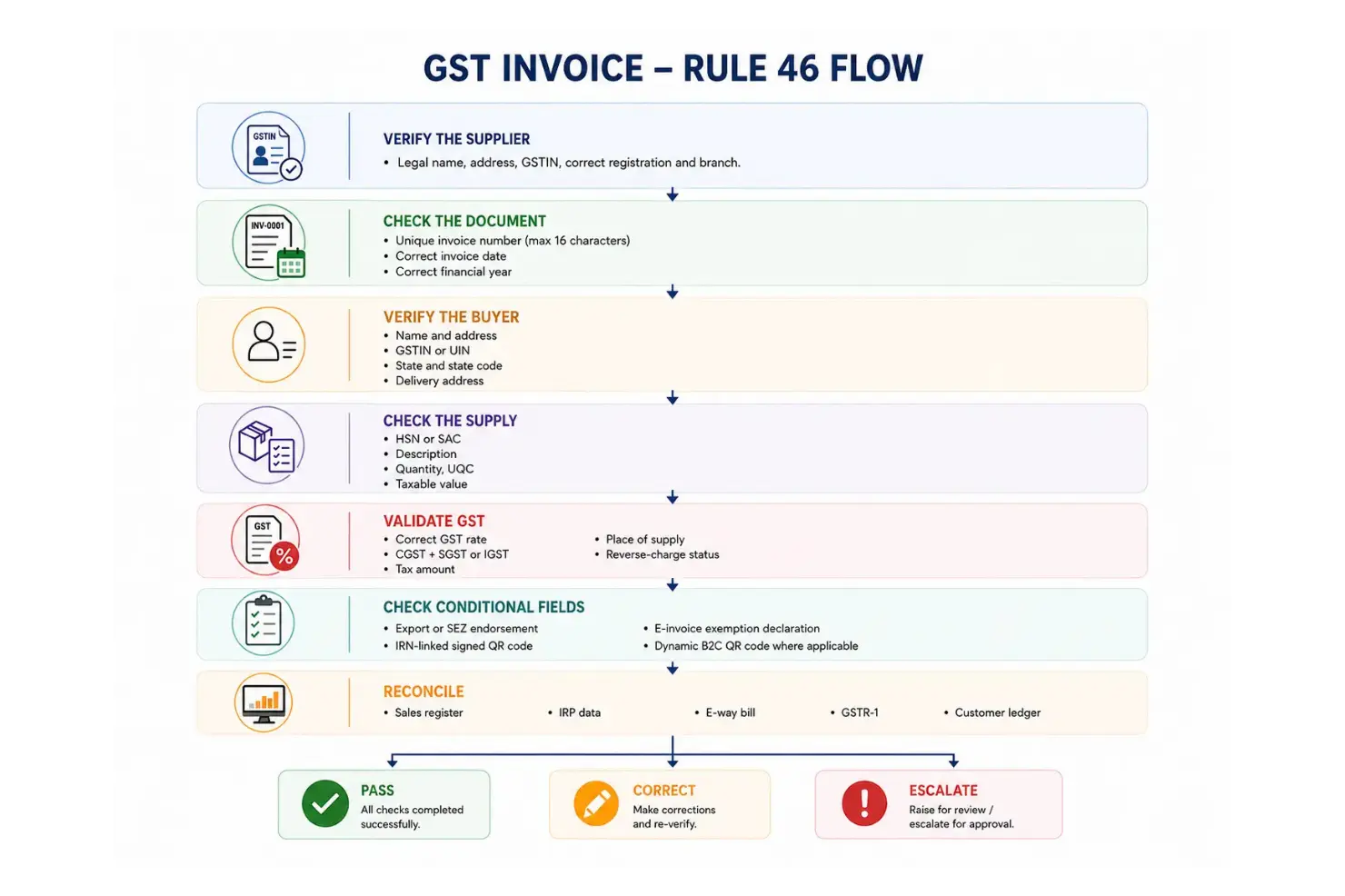
1. Verify the supplier — legal name, address, GSTIN, correct registration and branch.
2. Check the document — unique invoice number, maximum 16 characters, correct invoice date, correct financial year.
3. Verify the buyer — name and address, GSTIN or UIN, state and state code, delivery address.
4. Check the supply — HSN or SAC, description, quantity, UQC, taxable value.
5. Validate GST — correct GST rate, CGST + SGST or IGST, tax amount, place of supply, reverse-charge status.
6. Check conditional fields — export or SEZ endorsement, IRN-linked signed QR code, e-invoice exemption declaration, dynamic B2C QR code where applicable.
7. Reconcile — sales register, IRP data, e-way bill, GSTR-1, customer ledger.
Pass, correct or escalate.
Supplier Details
Invoice Details
Recipient Details
Supply Details
Tax Details
Transaction Details
Digital Compliance
A GST invoice audit should answer two questions:
Simply adding GSTIN, HSN and tax values to an invoice does not guarantee compliance. The invoice must also use the correct registration, invoice series, recipient details, tax type, place of supply and conditional declarations.
Businesses should audit GST invoices regularly, correct source master data and reconcile invoices with IRP records, e-way bills and GSTR-1.
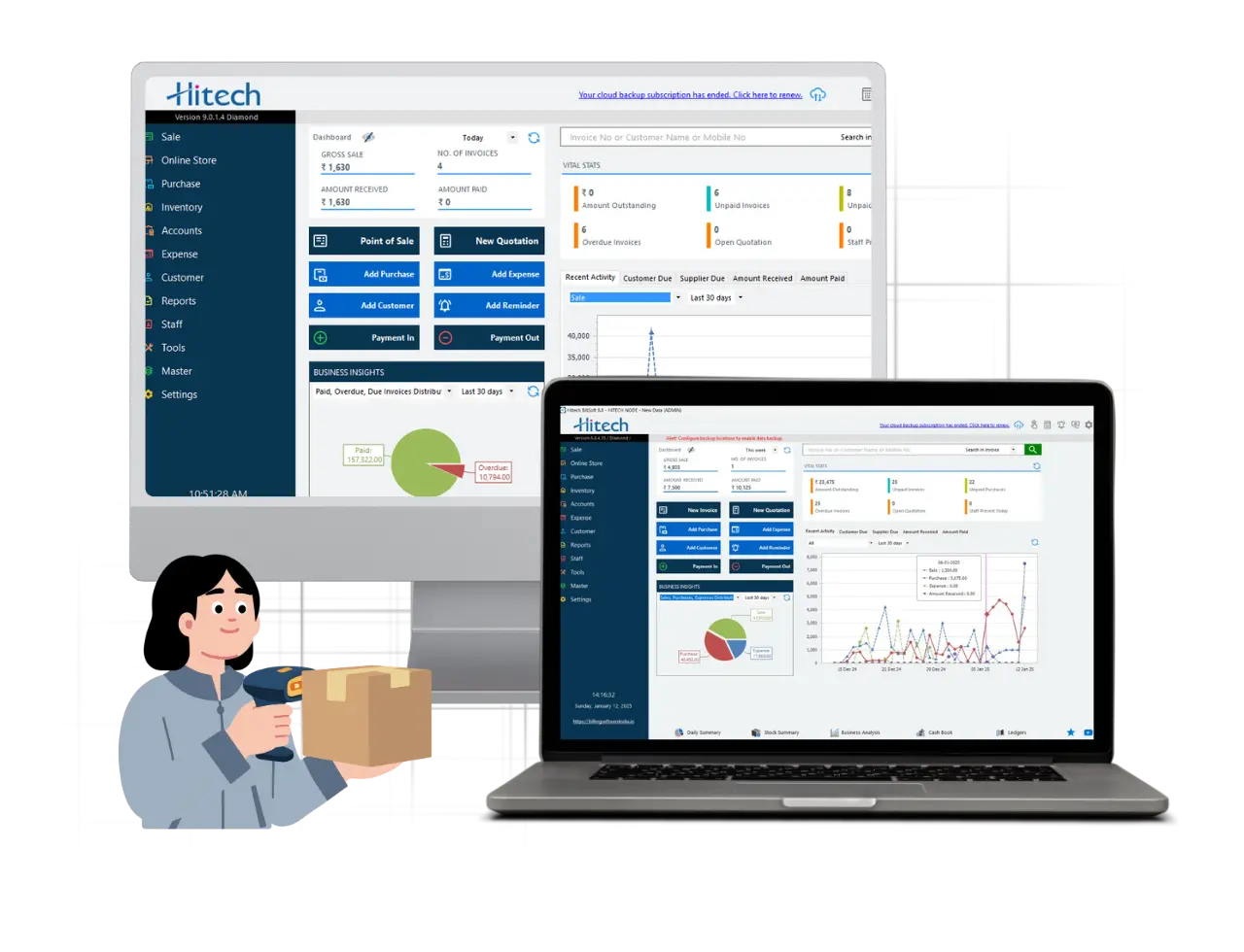
Using GST-compliant billing software like Hitech Billsoft can help businesses create organised GST invoices, maintain customer and item records, calculate tax and support e-invoice and e-way bill workflows.
Create accurate GST invoices and strengthen your billing compliance with Hitech Billsoft.
Join Millions of Business Owners already saving time and
money with Hitech Billsoft.